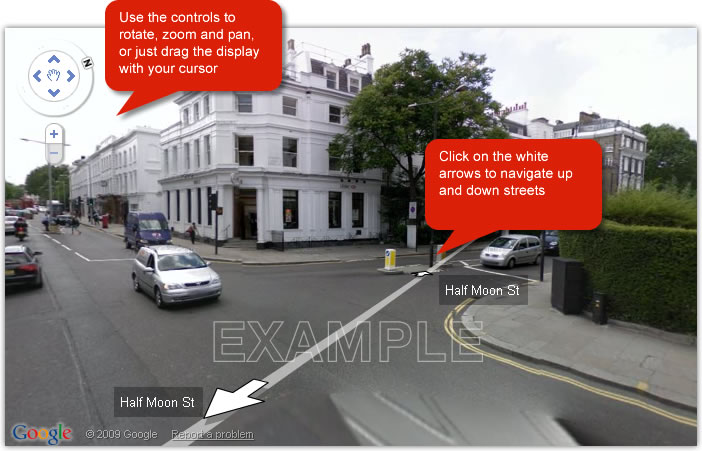
View properties to buy, to rent and for sale using Google Street View.
What is Google Street View?
Google Street View is a feature which lets you explore and navigate a neighbourhood through panoramic street-level photographs. It enables you to view and navigate 360º street level imagery.
Is everywhere covered by Google Street View?
A large majority of London is all ready covered, however certain areas of Surrey are currently unmapped.
Those areas which are currently unmapped will follow in the future.
Can I only view properties?
No. With Google Street View it is possible to view your local neighbourhood, your nearest park, or the local transportation links. All you need to do is click on the white arrows and you can travel all over London.
How do I use it?
Visit any property for sale or to rent in London and click on the 'Maps' icon.
You will then see the Street View Links.
Click the white arrows located on screen to 'move' along the street. You can use this feature to explore the length of the street each property is located on. In the top left of the map is a compass, allowing you to change your view direction and your street view zoom level.
Performance cookies let us collect information about how the website is used. For example, we may record what pages are visited most. This data allows us to see where we could optimise the website and make it more efficient.
Foxtons: tbp, twp2, tws. tco, referrer
Foxtons uses performance cookies to help understand how our visitors use the website and how we can improve our website.
We also host the following third-party solutions, which may set the following cookies:
Google Analytics: _ga, _gat, _gat_UA-<TOKEN>, utmx, utmxx
Google Analytics cookies are used to distinguish users and sessions and gather usage data related to your visit to our website so we can improve our website.
AddThis: _atssc, _atuvc, _atuvs, _
Some pages may have the AddThis social plugin to allow you to share pages to your social network and for Foxtons to view reports on which pages were shared and how.
Crazyegg: _ceir, is_returning, _CEFT, _ceg.s, _ceg.u, s, u, cer.s, cer.v
Crazyegg is a third-party optimisation solution which helps us to test, analyse and improve each user's experience on the website based on their online behaviour.
Convert: _conv_v, _conv_s, _conv_r, _conv_sptest
Convert is a third-party A/B testing solution which helps us to test different versions of web pages to determine which design or content provides the best user experience.
Functionality cookies allow the website to remember settings such as the screen size, which lets us serve the right content without overloading any network or device capacity.
mortgage - Stores your mortgage settings for use across the website.
recent - Stores information of the last pages you have viewed.
screen - Stores the screen size of the device that you are viewing our website on. This allows us to serve the right content for the device you are using without overloading your network and preserving best layout.
Strictly necessary cookies
Strictly necessary cookies allow you to log into your account and view account details without a need to log in again every time you navigate to subsequent page. These cannot be disabled.
foxtons_session - Stores information about whether you are logged in into your account or not.
visit_secure_token2 (session) - Stores information necessary to access your account.
cookie_policy_displayed - Stores information about the cookie policy declaration.
search - Stores your preferences as to how you prefer your results to be displayed i.e display 10 properties per page and price filter ‘from highest to lowest'.
is_logged_in - Recognize when a user is logged in, to allow access to restricted areas of the site.
What are cookies?
To make your experience visiting the Foxtons website as simple and convenient as possible we place small data files known as "cookies" on your computer. This practice is used by many websites.
Cookies are created when your browser loads the website. The website sends information to the browser which then creates a text file. Cookies are stored on your device for various periods of time, from as short time as the duration of your browsing session to several months.
Every time you come back to the website, the browser retrieves and sends cookies to the server, which helps to improve your experience of the website by:
Remembering settings, so you don't have to re-enter them every time you visit
Remembering your last properties and searches, helping you to keep on top of new listings
Measuring use of the website so that we can see where we can improve
You can manage and/or delete these small files from your device, but please be aware that this will limit the functionality that we are able to offer to you.